Arrow Doodle: A Creative Typography Tool for Dynamic Visual Communication
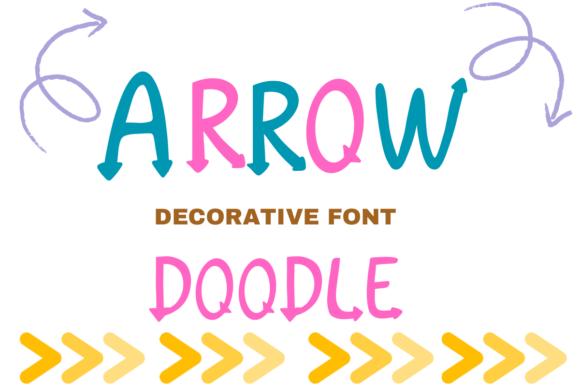
Typography is more than just choosing a font—it's about conveying tone, guiding attention, and enhancing visual storytelling. Arrow Doodle is a distinctive decorative display font that brings a sense of motion and personality to any design. Its hand-drawn aesthetic, combined with directional arrow elements built into each letterform, makes it a standout choice for creators who want to inject energy and clarity into their visual work.
Unlike traditional fonts that focus on legibility or minimalism, Arrow Doodle leans into its playful structure. Each character integrates arrows in a way that suggests movement, direction, or progression. This makes it particularly effective in contexts where visual cues matter—such as educational materials, project planning boards, or branding elements for creative businesses.
How Arrow Doodle Fits Into a Design or Communication Workflow
Design workflows often begin with conceptualization, followed by visual ideation, asset creation, and final implementation. Arrow Doodle can be introduced at multiple stages to enhance clarity and visual appeal. During the ideation phase, for instance, it can be used in mood boards or brainstorming documents to represent direction or flow. In the execution phase, it becomes a stylistic asset that adds character to headers, labels, or interface elements.
For educators and instructional designers, Arrow Doodle can serve as a functional yet expressive font in worksheets, slide presentations, or digital learning tools. The arrows embedded in the letters subtly reinforce directional cues, which can be especially useful in step-by-step guides or interactive learning modules.
Using Arrow Doodle Across Project Stages
One of the strengths of Arrow Doodle is its versatility across different phases of a project. Here's how it can be integrated:
- Before a project begins: Use Arrow Doodle in planning documents, vision boards, or project outlines to visually represent movement or goals.
- During implementation: Apply it in design mockups, UI elements, or branded assets to maintain a consistent and engaging visual tone.
- After completion: Incorporate it into reports, summaries, or infographics to highlight key directional insights or next steps.
This flexibility allows designers and creators to maintain continuity in visual language throughout a project lifecycle without sacrificing functionality.
Compatibility and Integration with Other Tools
Arrow Doodle works best when paired thoughtfully with other design tools and typographic elements. It’s compatible with most major design platforms including Adobe Creative Suite, Figma, Canva, and Sketch. When integrating Arrow Doodle into a project, consider the following:
- Pairing with complementary fonts: Since Arrow Doodle is a decorative font, it should be balanced with clean, readable typefaces like sans-serif fonts for body text.
- Color and contrast: Use high-contrast color schemes to ensure legibility, especially when using the font in digital interfaces or print materials.
- File formats: Ensure that the font is embedded or exported correctly when sharing files across platforms or with clients to maintain visual integrity.
By aligning Arrow Doodle with the right supporting tools and resources, creators can ensure both aesthetic appeal and functional clarity in their designs.
Practical Use Cases for Arrow Doodle
Arrow Doodle is especially effective in environments where visual storytelling and engagement are key. Here are some real-world applications where it shines:
- Classroom and educational materials: Enhance worksheets, flashcards, or lesson plans with a playful yet directional font that supports learning through visual cues.
- Branding and marketing: Use it in logo design, social media posts, or packaging for brands that want to convey a sense of movement, adventure, or creativity.
- Handmade and craft projects: Perfect for custom labels, greeting cards, or digital stickers where a hand-drawn, organic feel is desired.
- Interactive and digital design: Apply in mobile app interfaces, website headers, or dashboard elements to guide user attention or indicate progression.
In each of these cases, Arrow Doodle doesn’t just add visual flair—it actively contributes to the function and flow of the content it supports.
Workflow Tips for Using Arrow Doodle Effectively
Integrating Arrow Doodle into your creative process requires attention to both aesthetics and usability. Here are some practical tips to help you make the most of this unique font:
- Use sparingly: Because of its decorative nature, it’s best used for headlines, callouts, or short text blocks rather than long-form content.
- Test for legibility: Especially at smaller sizes or in low-resolution environments, always preview how the font appears across different devices and formats.
- Maintain visual consistency: If you're using Arrow Doodle across multiple assets, keep a style guide that outlines size, color, and spacing standards to ensure uniformity.
- Combine with directional graphics: Since the font already includes arrow motifs, aligning it with related visual elements like icons or diagrams can reinforce the directional theme.
These small but impactful adjustments help ensure that Arrow Doodle enhances your design without overshadowing its purpose.
Long-Term Value and Adaptability
Fonts like Arrow Doodle offer more than just immediate visual appeal—they contribute to a brand’s or project’s evolving identity. Over time, consistent use of a distinctive font can become part of a visual language that audiences recognize and connect with. Whether used in recurring educational content, seasonal marketing campaigns, or personal creative projects, Arrow Doodle retains its relevance by offering a balance between uniqueness and adaptability.
For long-term use, it’s important to archive font files securely and ensure licensing compliance, especially if the font will be used commercially. Keeping a backup of project files with embedded fonts also helps maintain consistency across versions and collaborators.
Conclusion: Making the Most of Arrow Doodle in Your Creative Process
Arrow Doodle is more than a decorative font—it's a tool that supports visual storytelling, directional clarity, and creative expression. By understanding how it fits into your workflow, what tools it integrates with, and how it can evolve with your projects, you can use it to enhance communication in both digital and print formats. Whether you're a designer, educator, marketer, or hobbyist, incorporating Arrow Doodle thoughtfully can elevate your work and help your message move forward—literally and figuratively.